GMAIL TIPS GET THROUGH YOUR GMAIL FASTER WITH KEYBOARD SHORTCUTS
GMAIL TIPS GET THROUGH YOUR GMAIL FASTER WITH KEYBOARD SHORTCUTS
Using keyboard shortcuts will help you to save milliseconds off every action, which can add up to a lot of saved minutes each week. Enable keyboard shortcuts in Settings and use "j" and "k" to navigate up and down with in your inbox, "o" to open messages, "r" to reply, "c" to compose, "s" to add or remove a star, "e" to archive, and more. Hit "?" at any time to see the reference guide with a full list of keyboard shortcuts.
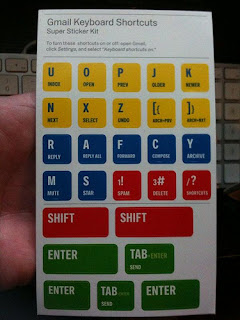
Jumping
g then i : Go to Inbox
g then s : Go to Starred conversations
g then t : Go to Sent messages
g then d : Go to Drafts
g then a : Go to All mail
g then c : Go to Contacts
g then b : Go to Buzz
g then k : Go to Tasks
g then l : Go to Label
Threadlist selection
* then a : Select all conversations
* then n : Deselect all conversations
* then r : Select read conversations
* then u : Select unread conversations
* then s : Select starred conversations
* then t : Select unstarred conversations
Navigation
u : Back to threadlist
k / j : Newer/older conversation
o or <Enter> : Open conversation; collapse/expand conversation
p / n : Read previous/next message
` : Go to next inbox section
~ : Go to previous inbox section
Application
c : Compose
/ : Search
q : Focus chat contact search
? : Open shortcut help
Actions
, : Move focus to toolbar
x : Select conversation
s : Rotate superstar
y : Remove label
e : Archive
m : Ignore conversation
! : Report as spam
# : Move to trash
r : Reply
<Shift> + r : Reply in a new window
a : Reply all
<Shift> + a : Reply all in a new window
f : Forward
<Shift> + f : Forward in a new window
<Shift> + n : Update conversation
<Tab> then Enter : Send mail
<Esc> : Focus last chat mole
] / [ : Remove conversation from current view and go previous/next
} / { : Archive conversation and go previous/next
z : Undo last action
. : Open more actions menu
<Shift> + i : Mark as read
<Shift> + u : Mark as unread
_ : Mark unread from the selected message
<Ctrl> + s : Save draft
+ or = : Mark as important
- : Mark as not important
<Shift> + l : Like/Unlike Buzz
<Shift> + t : Add conversation to Tasks


Comments
Post a Comment